

Dear Member Essentials Admins,
To close out the 2025-2026 League year, we are excited to announce more new features. Take note, some of the ones mentioned are for Plus Leagues only. Also, please review the helpful guides below to assist with a smooth transition into the new League year.
Trainings
- Office Hours - Office Hours are informal, drop-in sessions where Leagues can ask questions, get real-time guidance, and receive hands-on support with Member Essentials - Member Portal. Whether you need help troubleshooting, best practices, or a quick walkthrough of a feature, our team is available to support you in a collaborative, low-pressure setting. Please note that while we will do our best to assist within the hour, some questions or issues may require additional follow-up after the session. Office hours are held weekly. To see the schedule and sign up, go to the AJLI Event Calendar under AJLI on the member portal.
- Support Sessions – Please be mindful when booking Support sessions. If you can no longer attend, you can reschedule or cancel your booking by using the Reschedule link in the confirmation email. You can search for the subject line, e.g., Confirmed: Member Essentials 30 min/1 hr Support. If you can’t find the booking confirmation, please email: MemberEssentials@ajli.org.
Prepare for the New League Year
- See the following article for a guide on configuring your member portal for the new League year: League Year Transition: Getting Ready for the New League Year
- Troubleshooting Login issues – If Members have issues logging in, you can resend their invitation links. See Re-Enable Invite Link. Alternatively, you can temporarily update their username and/or password. See Changing a Member's Username or Password. Then, after they log in, they can update it through their Profile.
New Features and Updates
- Business Intelligence Reports (Plus and Basic)
Next-generation business intelligence reports are coming to Member Essentials. These reports are built on Microsoft Power BI, a business intelligence platform used for data analysis and for creating interactive reports and dashboards with visuals and KPIs.
AJLI has funded an organization-wide Power BI license, allowing integration of these reports into the Member Essentials platform. The reports will be available from the Member Essentials Query Tool.
To get started, there is a report allowing analysis of Member County History, including year-over-year change. Other reports will be coming soon.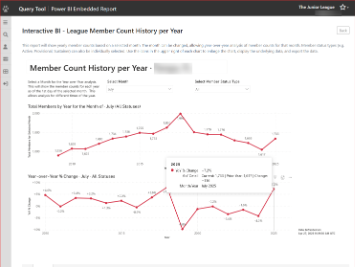
Any League member who has been assigned to a Member Essentials access level that includes access to the Query Tool will have access to these new reports. To access, go to the Query Tool, and filter the reports by the Category Interactive / Business Intelligence Reports. - Automatically Change Registration Status After an Event (Plus and Basic)
This feature allows you to automatically update the registration status of attendees after the event completes. This would most commonly be used to set the status to No Show for any attendee who did not attend. See the article > Automatically Change Registration Status After an Event - Additional Access Option for Calendars/Registration Tools (Plus and Basic)
A new access option in Registration Tool Setup allows the registration button to show for a specific Access Group. This allows a calendar to be visible to all members, but only a group of members can register. A common use for this feature would be a Sustainer Event calendar that is visible to all members, but only Sustainer members can register for the event. See the article > Advanced Setup and Editing Registration Calendar > Access - Dues Landing Page Configuration (Plus)
This feature allows you to configure introductory text at the top of the Dues Landing Page. The text will appear on the very first screen, above the payment options. The feature is available in the Dues Management tool, in a new tab called Dues Display. - Stripe Data Update (Plus)
In order to improve the completeness and accuracy of financial reports, Member Essentials now gets financial data directly from your League's Stripe account. This does introduce a delay, as online transactions need to "settle" in Stripe before they can be sent to Member Essentials.
Online transactions (credit card payments) will take up to 24 hours to show in Member Essentials. This has introduced a delay as well for offline transactions (i.e. check payments, dues adjustments), but the team is working on a solution, and this will be solved soon so that offline transactions will again appear more quickly. - Little Green Light Syncing Update (Plus)
Digital Cheetah has been working on a new LGL syncing tool to address the syncing issues experienced by some Leagues. We will be working directly with Leagues that have reported syncing issues to activate this new tool.
What’s Next (Coming in the Summer)
To finish the 2025-2026 League year, two more features will be added/updated. The team is hard at work developing the feature enhancement plan for 2026-2027. See the following roadmap article for updates > Member Essentials Plus Development Roadmap
- Positions Assignment Improvements The Position Manager tool will be redesigned to enhance the position assignment screen, including new functionality that allows assigning members in bulk, regardless of whether they participated in the Placement Matching sign‑up process.
- Email Merge Queries This feature will introduce a new type of query in the Query tool - an Email Merge query. Leagues will be able to run a query and then build a custom email to members which includes merge fields from the underlying query. This can be used for:
- Dues balance reminders
- Member requirement reminders
- New placement announcements
Take note, this feature will not support emails to non-members due to industry regulations and anti-spam laws.
- eTicket Confirmation Emails and Reminders – (Add-On Feature for Plus Leagues)
eTicket confirmation emails have been updated with clearer instructions, making it easier for attendees to access their eTicket. The eTicket email sent to the purchaser will be more clearly identified, and additional attendees on the order will be notified of the person who received the eTickets. In addition, a new Reminder Email can be configured for eTickets, allowing the eTickets to be resent to the purchaser some number of days before the event.
Important Information
Please see this article for important information on using third-party developers or consultants to build or manage your public website or member portal > Using Third Parties for Member Portal and Website Support
Best,
Member Essentials Support Team
JL MEMBER ESSENTIALS
email: MemberEssentials@ajli.org
knowledge base: https://support.jl.org