
The AJLI guidelines establish the following timeline. Members who transfer within each time period (span of months) should be charged dues as follows.
- June 1st to September 30th - Your League collects full dues for the League year, including AJLI per capita dues of $43.
- October 1st to December 31st - Your League collects half dues for the League year and does not collect the AJLI capita dues.
- January 1st to May 31st - Your League has started collecting dues for the following year. The transferring Member is expected to pay for the following year and does not owe dues for the current year.
The setup can be altered to reflect different time periods. For example, if your League follows a July to June League year, then adjust the time periods as follows. Note: this timeline would still start the 2nd time period in October, as this is when AJLI dues billing occurs.
- July 1st to September 30th
- October 1st to December 31st
- January 1st to June 30th.
Create Local Statuses
The amount of dues charged to a Member is based on their Member status. For incoming transfers, three statuses are created to represent the three different time periods for the transfer, based on the AJLI Guidelines.
- June 1st to September 30th
- October 1st to December 31st
- January 1st to May 31st.
These time periods are represented as Member statuses for incoming Active Members.
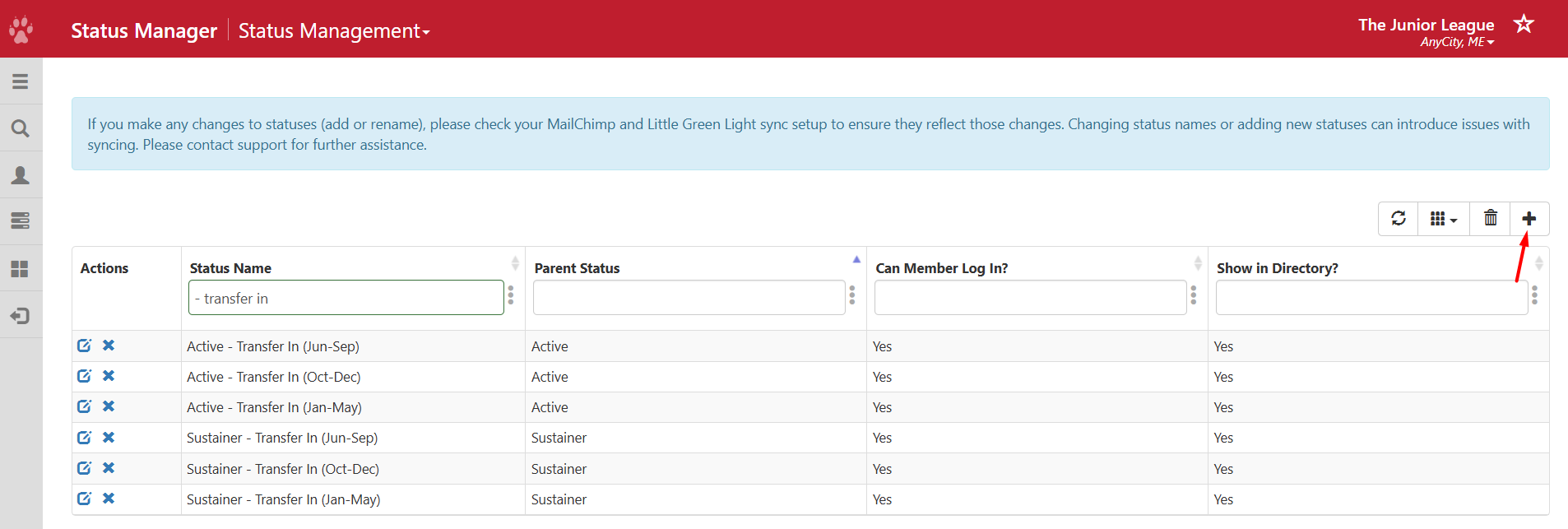
- Active - Transfer In (Jun-Sep)
- Active - Transfer In (Oct-Dec)
- Active - Transfer In (Jan-May)
A similar set of statuses would also be created for other Member types that are charged dues when transferring. For example, for Sustainer Members, statuses would be created as follows:
- Sustainer - Transfer In (Jun-Sep)
- Sustainer - Transfer In (Oct-Dec)
- Sustainer - Transfer In (Jan-May)
Create the local statuses by following the article Create Local Statuses (Member Essentials Plus). For Active Members and Sustainer Members, it should look like the page below.
Assign Dues Requirements
The next step is to assign the dues requirements for each of the new statuses. According to the AJLI Guidelines, dues requirements for incoming transfers should be defined as follows:
- June 1st to September 30th: The League should charge inbound transferring Members accepted by September 30, 100% of its Member dues, including the $43 AJLI per capita dues. The AJLI per capita charge will appear on the Receiving League’s October 1 invoice.
- October 1st to December 31st: The League should charge the inbound transferring Member 50% of the current League year Member dues, not including the $43 AJLI per capita dues. The League will not be charged AJLI per capita dues for Members transferred in current status, since per capita dues were paid for by these Members’ Sending Leagues.
- January 1st to May 31st: Should charge the inbound transferring Member 0% of the current League year Member dues, including AJLI per capita dues. It should charge full Member dues, including AJLI per capita dues, for the upcoming League year only. IMPORTANT: In order for this to work properly, the League should switch the Dues Management system to the upcoming year in January before processing any January transfers.
Assign the requirements for each of the Member statuses by following the article in Membership Dues Requirements.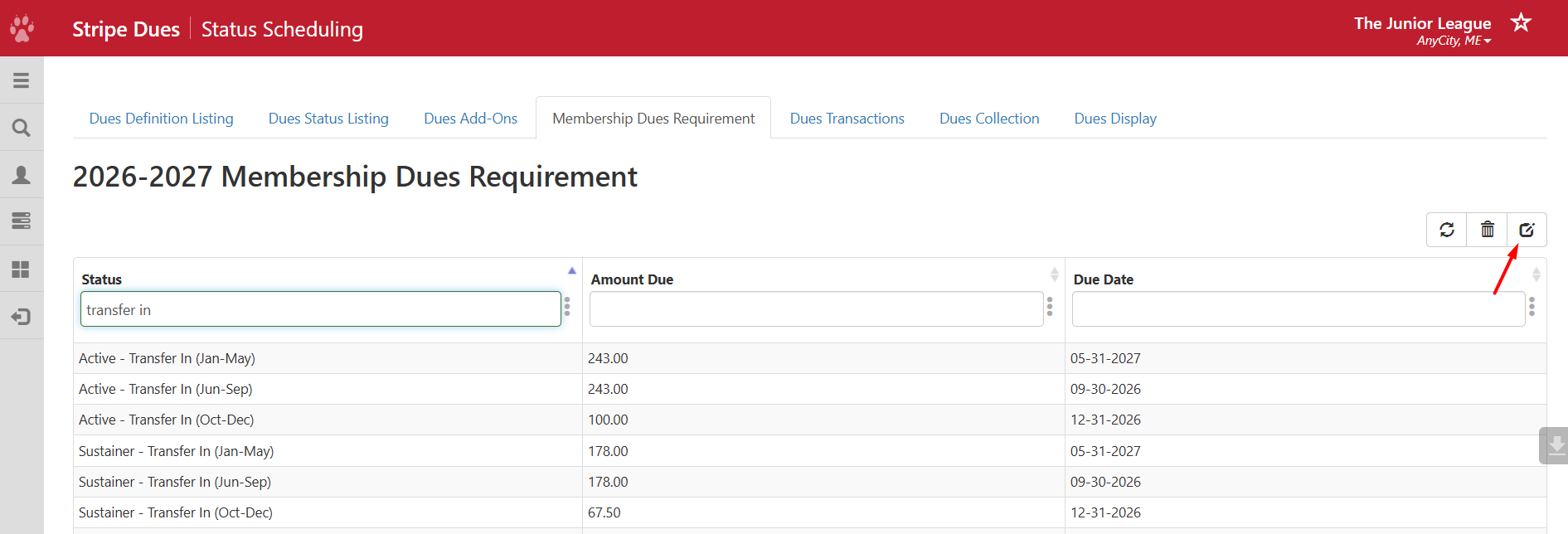
Create Dues Definitions
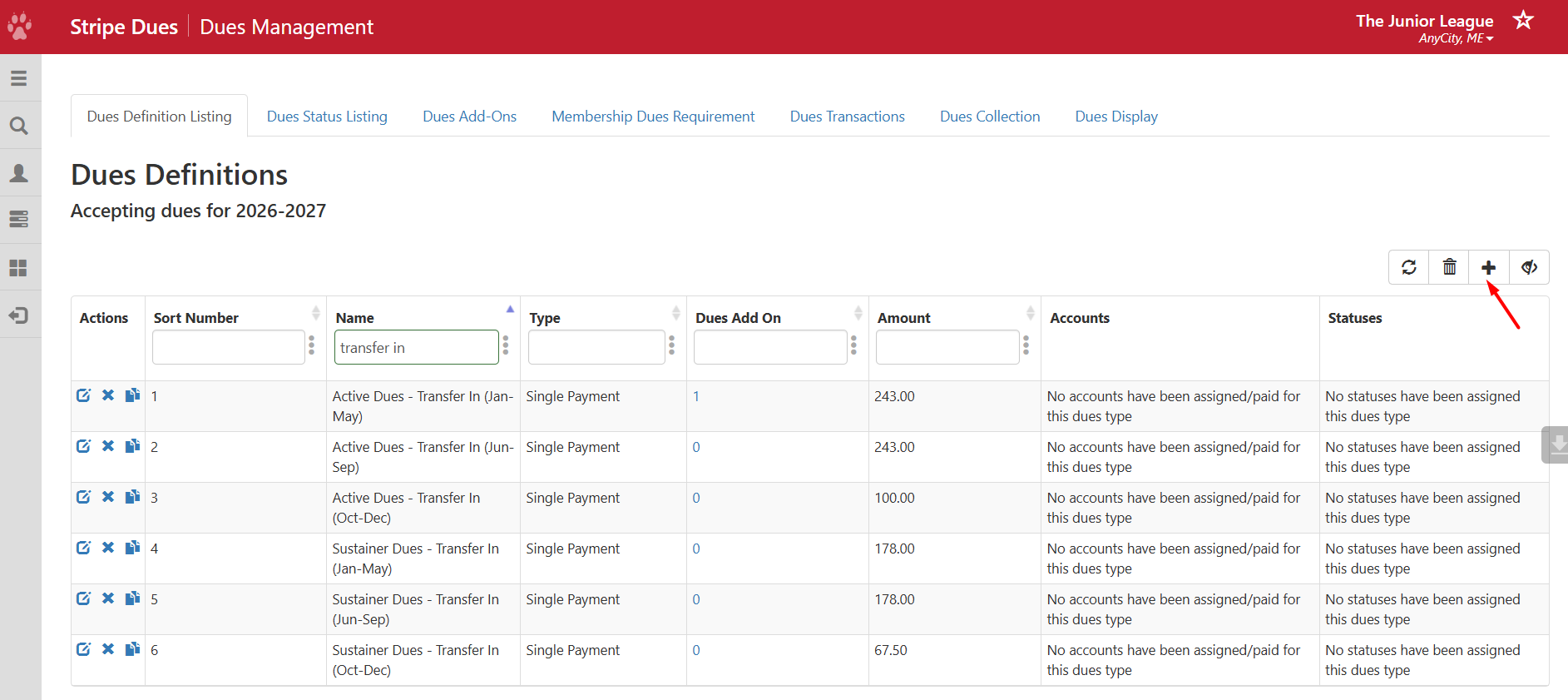
Create a Dues Definition for each time period and for each status, mirroring the dues requirements. It is recommended that transfers be offered only with a single payment option; payment plans are not recommended for transfers. Here are examples:
- Active Dues - Transfer In (Jun-Sep)
- Active Dues - Transfer In (Oct-Dec)
- Active Dues - Transfer In (Jan-May)
- Sustainer Dues - Transfer In (Jun-Sep)
- Sustainer Dues - Transfer In (Oct-Dec)
- Sustainer Dues - Transfer In (Jan-May)
See Creating a Dues Definition.
If your League charges a transfer fee, it can be created as a required dues add-on and assigned to each Dues Definition. See Creating Dues Add-Ons and Enabling Dues Add-Ons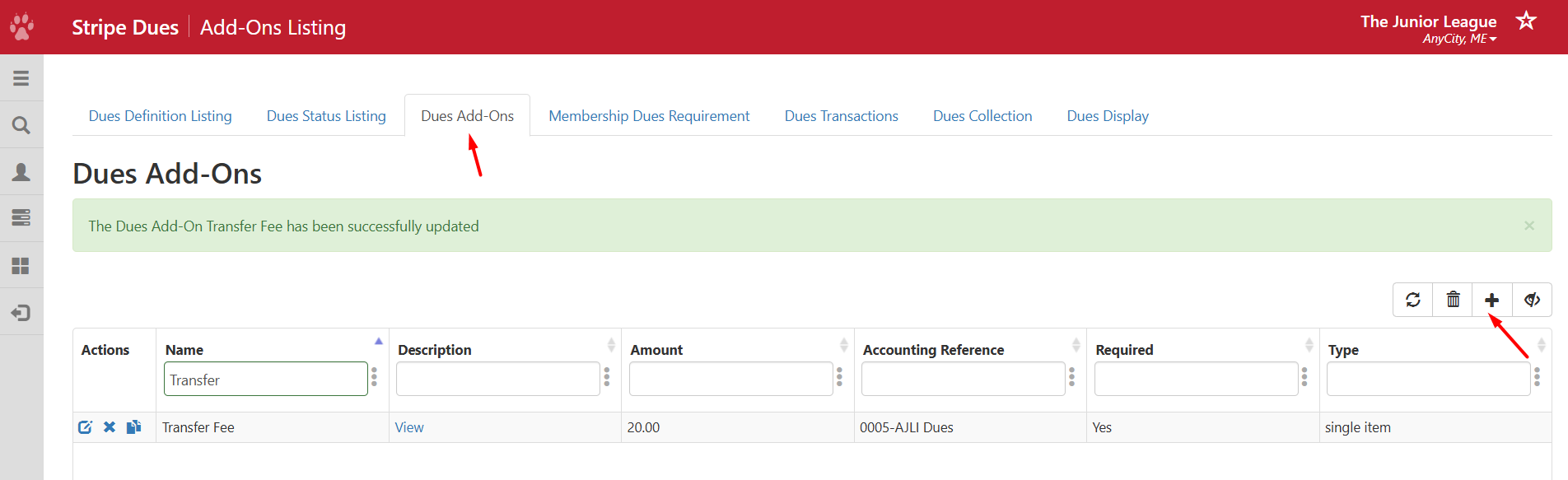
Assign Statuses to Dues Definitions
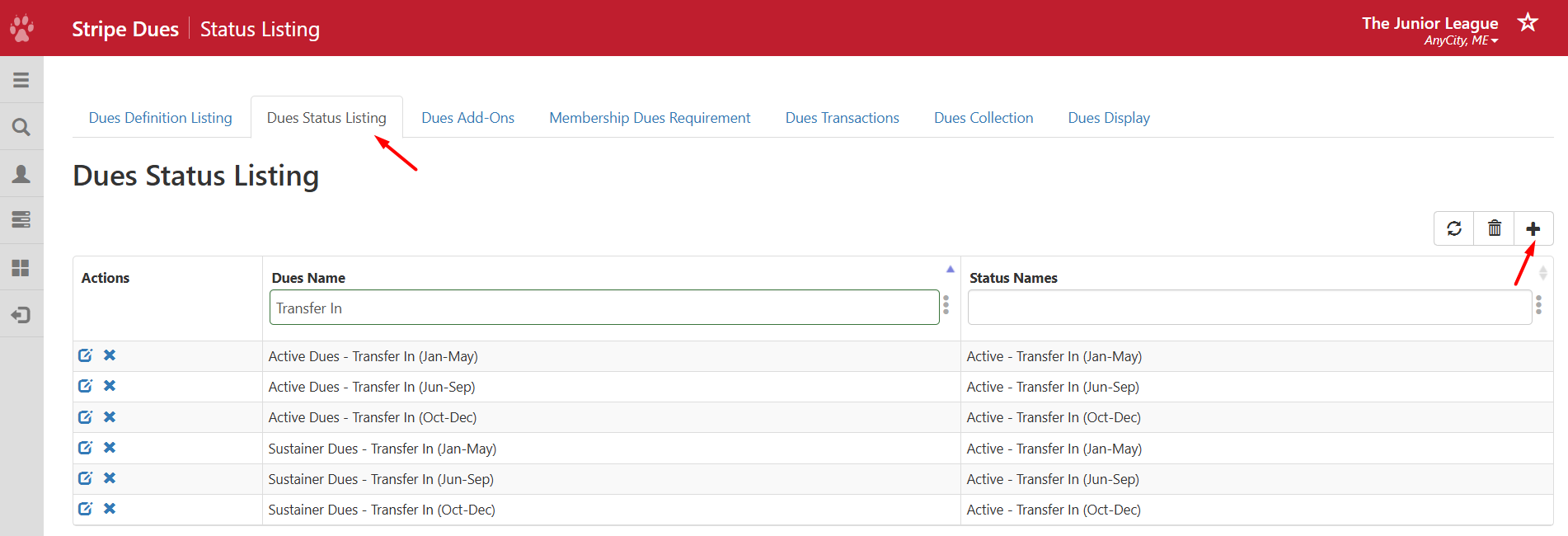
After you create the Dues Definitions, go to Dues Status Listing and link the definitions to their corresponding statuses. See Assigning Dues Definitions to a Status.
Accepting Incoming Transfers
See the following article for instructions on accepting incoming transfers: Accepting Transfers with Member Essentials. When accepting the transfer, you will be prompted to assign the incoming Member a Member status. Select the appropriate Member status corresponding to the time period for the current month. For example, if you are accepting a transfer in August, and the Member is Active, assign the status Active - Transfer In (Jun-Sep).
Charging Dues to Incoming Transfers for the 2nd Half of the Year
As explained above, AJLI guidelines assume your League is following a similar timeline for dues collection, but the setup can be altered to reflect different time periods.
NOTE: If your League is collecting dues for incoming transfers in the 2nd half of the League year for the current year, while simultaneously collecting dues from membership for the upcoming year, then the Simple Store would have to be used. Once you switch the Dues Management system to start collecting dues for the upcoming League year (e.g., 2026-2027), you can no longer collect dues for the current year (e.g., 2025-2026). This is because you can't use Dues Management to simultaneously collect dues for two different years. So, if you still want to collect dues for the current year for incoming transfers, while simultaneously collecting dues for the new year for your Members, you will have to use the Simple Store for the incoming transfers.
To create a Store page to collect fees, see How to Use Simple Store To Collect Fees.