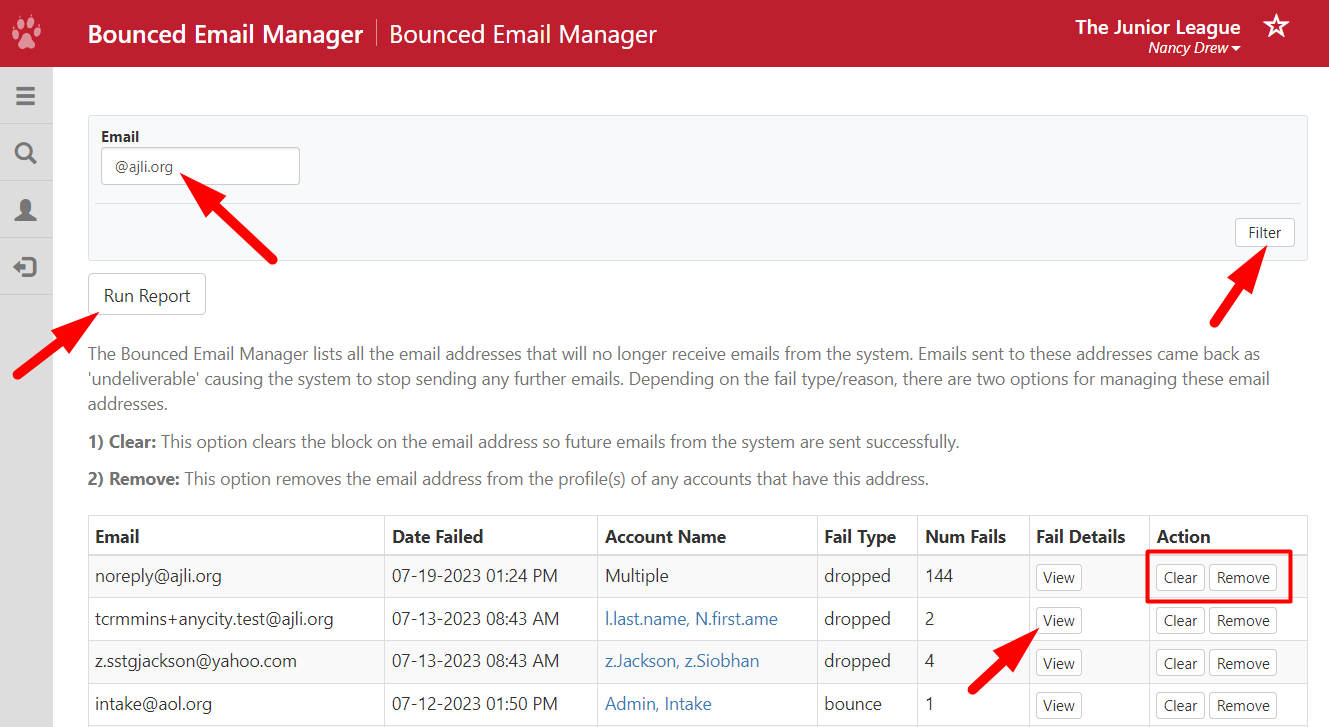
The Bounced Email Manager lists all the email addresses that will no longer receive emails from the system. Emails sent to these addresses came back as 'undeliverable' causing the system to stop sending any further emails.
Required Access:
You will need the Email Administrator or Administrator access level.
Where to go:
- From the Member Portal, go to Admin > Member Management
- Select Bounced Email Manager
Steps to be Taken:
- Search for a member by using the Email filter.
- Depending on the fail type/reason, there are two options for managing these email addresses:
1) Clear: This option clears the block on the email address so future emails from the system are sent successfully.
2) Remove: This option removes the email address from the profile(s) of any accounts that have this address.
- Under Fail Details, click on View to see a history of the bounced email, including the Reason.
- If you need to see a report with all the details, click on Run Report.